

Use protective markings for government information. Follow your organisation’s procedures to add them. Use the capitalisation style shown in the Protective Security Policy Framework (PSPF). The use of all capitals in PSPF markings is standard practice internationally. It is an exception to the Style Manual principle of minimal capitalisation.
Understand the Protective Security Policy Framework (PSPF)
The PSPF requires Australian Government entities to follow specific security practices. These practices protect the government’s people, information and resources. PSPF requirements include how information is classified and marked, and what this means for its:
- storage
- handling
- access
- disposal.
Refer to your organisation’s protective security policy. It shows you how to apply PSPF requirements.
Implementation of the PSPF by government entities is supported by the Department of Home Affairs.
For more information, consult:
- PSPF annual release – sets out what government entities must do
- PSPF guidelines – best-practice advice for implementing the PSPF annual release
- PSPF standards, including the Australian Government email protective marking standard.
- Standards that other ‘controlling authorities’ manage, including the Australian Government recordkeeping metadata standard.
Add markings to government information
All information from government business operations and services is given a marking under the PSPF. Some are mandatory markings and others are optional.
Always follow your organisation’s internal procedures when applying markings. Your organisation may instruct you to apply optional markings.
Security classifications
There are 4 levels of security classification:
- OFFICIAL: Sensitive
- PROTECTED
- SECRET
- TOP SECRET.
Use all capitals for these markings, except for OFFICIAL: Sensitive which uses all capitals and an initial capital.
Security classification markings are ‘protective markings’.
Security classification protective markings are mandatory. All ‘security classified information‘, including emails, must carry protective markings. You must also mark information metadata.
Protective markings set minimum requirements for how information is accessed, stored and communicated.
Other government information
All other information is marked as either:
- OFFICIAL – a routine level of protection
- UNOFFICIAL – information that is not part of official government duties e.g. personal emails.
Use all capitals for OFFICIAL and UNOFFICIAL.
OFFICIAL and UNOFFICIAL are not security classifications and are optional markings.
OFFICIAL is a protective marking. Information marked as OFFICIAL has minimal requirements for how it can be accessed, stored and communicated.
Information management markers (IMMs)
IMMs include:
- Legal Privilege
- Legislative Secrecy
- Personal Privacy.
Use initial capitals (title case) for IMMs.
IMMs identify information with access or use restrictions that are not related to security. They are not protective markers or security classifications.
IMMs are optional markings. To assess when and how you should apply IMMs, consult:
- your organisation’s procedures
- PSPF annual release
- PSPF guidelines.
Security caveats
Security caveat markings include:
- EXCLUSIVE FOR (named person)
- CABINET
- AUSTEO – ‘Australian Eyes Only’
- AGAO – ‘Australian Government Access Only’
- REL – ‘Releasable to’ e.g. REL AUS/CAN/GBR/NZL/USA.
Use all capitals for security caveats.
Various government ‘controlling authorities’ manage and administer security caveats.
Security caveats identify information that has extra handling requirements, beyond existing security restrictions.
Security caveats are not security classifications. But they must only appear with a security classification.
Security clearance requirements
Under the PSPF, people who access security classified information must hold a security clearance.
There are 4 clearance levels. Each level permits a different level of access to classified material:
- Baseline
- Negative Vetting 1
- Negative Vetting 2
- Positive Vetting
The Australian Government Security Vetting Agency (AGSVA) operates in line with the PSPF. AGSVA has more information about security clearances, including security clearance definitions.
Use initial capitals (title case) for security clearance levels.
Use text-based markings
The PSPF requires security classified information to be clearly marked with text-based markings. This applies unless text-based markings are impractical for operational reasons.
To achieve clear markings, the PSPF recommends that you:
- use recommended capitalisation, bolded text, large fonts and a distinctive colour (red preferred)
- place markings at the centre top and centre bottom of each page
- separate different types of markings and security caveats with unspaced double forward slashes
- arrange markings and place optional IMMs as shown in the example that follows.
Example
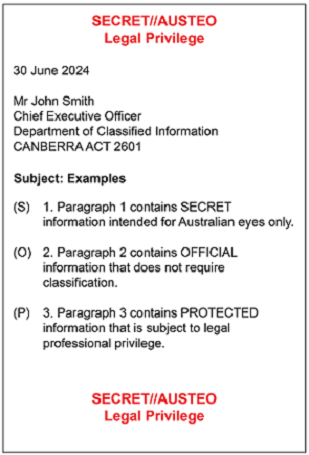
Image of ‘Figure 10: Marking physical (printed) information’, PSPF guidelines 2026, p 124. Provided by and courtesy of: Department of Home Affairs.
Colour-based marking
When you can’t use text-based marking, use an alternative colour-based marking. For more information, consult ‘9.2.3.2: Colour-based markings’ in PSPF guidelines.
Follow PSPF capitalisation style for markings in body text
Use the PSPF capitalisation style when you mention a marking in your content.
PSPF style makes the marking easy to spot in the text. It also helps users distinguish between a marking and the same words used descriptively.
It’s optional to use quotation marks around a protective marking the first time you mention it in body text.
Style Manual recommends using quotation marks at first mention to make technical terms stand out in non-technical content. However, PSPF capitalisation already ensures markings stand out in sentences. We have chosen not to use quote marks on this page.
But we do recommend using quotation marks for protective markings that follow expressions such as ‘stamped’, ‘marked’, ‘titled’, ‘defined as’ and ‘the term’.
Write this
- The board kept discussions secret to avoid speculation. [Descriptive use]
- Only people with a security classification of Negative Vetting 2 or above have ongoing access to TOP SECRET information. [Protective marking, PSPF capitalisation, first mention in body text]
- The report was stamped ‘OFFICIAL: Sensitive’. [Protective marking, PSPF capitalisation, quotation marks because introduced by ‘stamped’]
Not this
- The board kept discussions SECRET to avoid speculation.
- Only people with a security classification of Negative Vetting 2 or above have ongoing access to Top Secret information.
- The report was stamped Official: Sensitive.
Use non-breaking spaces
Use non-breaking spaces in protective markings and security clearances that contain 2 or 3 elements. This ensures that all elements stay together on one line.
You can insert a non-breaking space using the Unicode character U+00A0.
In HTML, use the entity to insert a non-breaking space.
The keyboard shortcut in Word is Ctrl+Shift+Spacebar.
Example
- OFFICIAL: Sensitive [Protective marking, non-breaking space before Sensitive]
- TOP SECRET [Protective marking, non-breaking space before SECRET]
- Negative Vetting 1 [Security clearance, non-breaking space before Vetting and before 1]
- Negative Vetting 2 [Security clearance, non-breaking space before Vetting and before 2]
- Positive Vetting [Security clearance, non-breaking space before Vetting]
Note on accessibility and readability
The Style Manual commissioned independent accessibility and readability testing on the use of all capitals for PSPF markings.
Accessibility professionals tested markings in all capitals for:
- screen readers using default settings
- screen readers using custom verbosity settings
- Braille displays
- compliance with Web Content Accessibility Guidelines (WCAG)
- readability by users who have low vision
- readability by users who are neurodivergent, including those with ADHD or dyslexia.
Summary of findings
There are no accessibility or readability concerns with using all capitals for PSPF markings.
Assistive technologies can identify all capitals and announce markings as words.
The use of all capitals for PSPF markings is not a failure under WCAG 2.2 Guideline 3.1 Readable.
All capitals have very little effect on the readability of short passages of text, such as protective markings. However, you should avoid using all capitals for long passages of text.
Other considerations
Don’t use CSS (Cascading Style Sheets) to style standard text so it appears as all capitals. Screen readers don’t detect CSS.
Things to consider when choosing a font:
- Check the typographic readability of the capital letters in your chosen font.
- Don’t publish your text as an image.
– Using real text allows users with their own CSS-based skins to enlarge or change fonts.
Release notes
This update of the digital edition ensures our guidance is consistent with Protective Security Policy Framework (PSPF) annual releases in 2026.
We have overturned the digital edition’s original rule to use initial capitals for protective markings. The overturned rule reflected the manual’s principle of minimal capitalisation. The digital edition now requires writers to follow PSPF capitalisation style. This approach:
- is consistent with international convention
- ensures the protective markings are easy to identify
- makes it easier to apply the rule across formats
- removes the potential for ambiguity in certain sentence constructions.
Most information in the ‘Security classification requirements’ callout has been rolled into general guidance. Its replacement callout, ‘Security clearance requirements’, focuses on the 4 levels of security clearance.
We have removed the hyphen from the phrase ‘security classified information’. This is contrary to the standard rule for 'noun + adjective' adjectival compounds, that is,‘security-classified information’. However, the unhyphenated form reflects a longstanding treatment in publications produced by the responsible agency, and in certain legislative definitions. Our view is that both forms are acceptable in general content. Choose one form and use it consistently.
The digital edition includes a new ‘Note on accessibility and readability’. The note supports the use of PSPF capitalisation – specifically all capitals – in government content.
There is also new section about using non-breaking spaces in protective markings and security clearances.
The sixth edition didn't include information about:
- Australian Government protective security policy
- the classification of information
- protective markings.
The chapter ‘Restrictions on publishing’ in the sixth edition focused on legal protections. These included copyright, privacy and defamation.
About this page
Co-created with
- Department of Home Affairs
References
Australian Government Security Vetting Agency (n.d.) Security clearance definitions, agsva.gov.au, accessed 22 September 2026.
Department of Home Affairs (n.d.) About PSPF, protectivesecurity.gov.au, accessed 20 May 2026.
Department of Home Affairs (2026) Australian Government email protective marking standard 2026, protectivesecurity.gov.au, accessed 27 August 2026.
Department of Home Affairs (2026) PSPF annual release, protectivesecurity.gov.au, accessed 20 May 2026.
⸺(2026) ‘9.2: Security classifications’, PSPF annual release, protectivesecurity.gov.au, accessed 8 July 2026.
⸺(2026) ‘9.3: Minimum protections and handling requirements’, PSPF annual release, protectivesecurity.gov.au, accessed 9 July 2026.
⸺(2026) ‘Table 4: Physical information: inside entity facilities’, ‘9.3.1: Protections and handling requirements for physical information’, PSPF annual release, protectivesecurity.gov.au, accessed 9 July 2026.
⸺(2026) ‘9.4: Information management markers’, PSPF annual release, protectivesecurity.gov.au, accessed 8 July 2026.
⸺(2026) ‘9.5: Security caveats and accountable material’, PSPF annual release, protectivesecurity.gov.au, accessed 8 July 2026.
⸺(2026) ‘9.6: Email protective marking standard’, PSPF annual release, protectivesecurity.gov.au, accessed 10 July 2026.
Department of Home Affairs (2025) PSPF guidelines, protectivesecurity.gov.au, accessed 20 May 2026.
⸺(2026) ‘Figure 10: Marking physical (printed) information’ [image], ‘9.2.3.1: Text-based markings’ PSPF guidelines, protectivesecurity.gov.au, accessed 13 July 2026.
⸺(2026) ‘9.2.3.2: Colour-based markings’, PSPF guidelines, protectivesecurity.gov.au, accessed 13 July 2026.
⸺(2026) ‘9.4: Information management markers’, PSPF guidelines, protectivesecurity.gov.au, accessed 8 July 2026.
⸺(2026) ‘9.6: Email protective marking standard’PSPF guidelines, protectivesecurity.gov.au, accessed 10 July 2026.
Department of Home Affairs (n.d.) PSPF standards, protectivesecurity.gov.au, accessed 20 May 2026.
National Archives of Australia (2015) Australian Government recordkeeping metadata standard (AGRkMS) V 2.2 [PDF 1.03 MB], naa.gov.au, accessed 28 August 2026.
Last updated
This page was updated Wednesday 23 September 2026.